
Google Ads vs Social Media Ads: Key Differences & Benefits
If you are trying to grow faster, this decision matters. Google Ads captures people who are already searching. Social ads create demand and push your brand into attention. This guide explains the real difference in plain language - so you choose based on ROI, not hype.
Quick takeaway: Most businesses win with a 2-channel system.
Rule: judge by Cost per qualified lead or Cost per sale — not cheap clicks.
The Big Difference (in one line)
Google Ads = captures existing demand (people searching).
Social Ads = creates demand (people scrolling).
That is why Google Ads often converts faster, while social ads often need more creative and repetition to work.
Google Ads (Search mindset)
Users are actively looking for a solution. Your job is to show up at the right moment.
- Higher intent
- Direct "problem → solution" path
- Great for lead gen + high-ticket
Social Ads (Scroll mindset)
Users are not searching. Your creative needs to stop them and create interest.
- Lower intent (usually)
- Creative does most of the work
- Excellent for awareness + retargeting
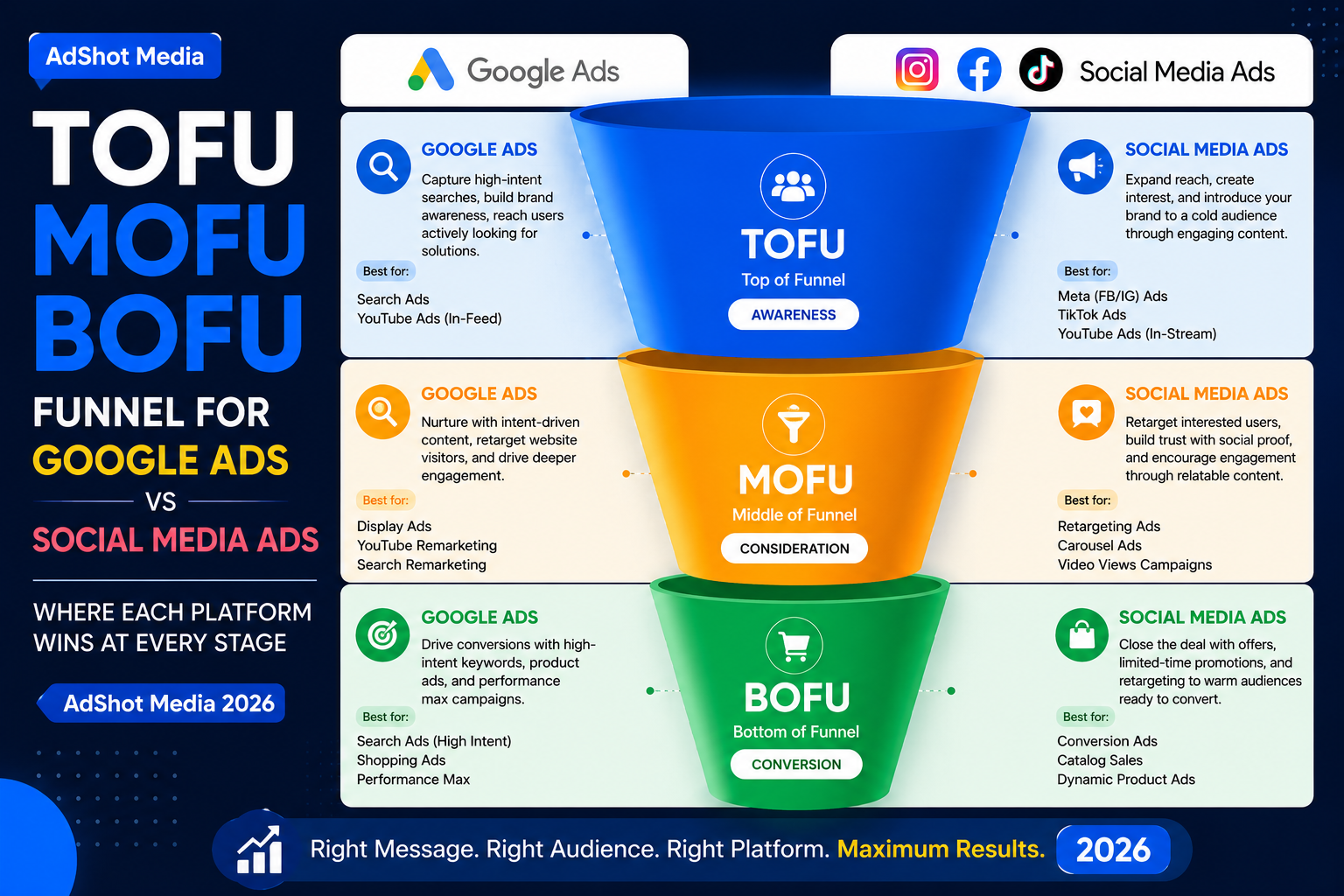
Intent Funnel: TOFU vs MOFU vs BOFU (Simple)
A quick way to decide which channel fits: Where is your customer in the buying journey?
-
TOFU (Top of Funnel) — "I am just discovering this."Best channel: Social Ads (Reels, video, stories, awareness).
-
MOFU (Middle of Funnel) — "I am comparing options."Best: Both (remarketing, comparison pages, testimonials).
-
BOFU (Bottom of Funnel) — "I am ready to buy/call."Best channel: Google Search Ads (high intent keywords).
Google Ads vs Social Media Ads (Side-by-Side)
This table is what most marketers never show you. Use it to choose based on your actual goal.
| Factor | Google Ads | Social Media Ads |
|---|---|---|
| User intent | High (searching now) | Medium/Low (scrolling) |
| Speed to leads/sales | Faster | Slower (needs creative + repetition) |
| Creative dependency | Medium (ad copy + landing page) | Very High (creative is the engine) |
| Targeting style | Keywords, intent, audience signals | Interests, behavior, lookalikes, engagement |
| Typical CPC | Higher in competitive niches | Often cheaper clicks (but lower intent) |
| Best for | Lead gen, high-ticket, urgent problems | Awareness, ecom impulse buys, remarketing |
| Best KPI | Cost per qualified lead / call / sale | Cost per purchase, MER, CAC, view-through + assisted conversions |
The Cost & ROI Reality (Don't compare CPC)
Most people compare these channels using CPC (cost per click). That is the wrong metric. A cheaper click can be useless if it does not convert.
Bad comparison
"Facebook CPC is ₹8 and Google CPC is ₹60, so social is better."
Wrong — CPC does not tell you lead quality or revenue.
Good comparison
"Cost per qualified lead / cost per sale is lower on which channel?"
Right — this measures business outcomes.
Simple ROI formula (use this)
Profit per sale ÷ Cost per sale = ROI efficiency.
And for lead gen: Lead-to-sale rate matters more than clicks.
Best Use-Cases (What to choose based on your business)
Pick based on the outcome you want right now.
- Service businesses (solar, home services)
- High-ticket or urgent needs
- Flight booking calls / changes / cancellations
- New brand, new product
- Strong visual creative
- Business owner-led storytelling
- Search captures demand
- Social builds demand + retargeting
- Better blended CAC / MER
The Best System: Capture + Create Demand
The highest ROI approach for most businesses is a simple 3-step system:
-
1) Capture intent (Google Search)Bid on BOFU keywords and send users to a fast, clear landing page.
-
2) Build awareness (Social)Run short videos, before/after, testimonials, and educational creatives.
-
3) Retarget (Both)Retarget site visitors and engaged users with proof + offer + CTA.
Want AdShot Media to build your ROI system?
We engineer Google Ads systems that prioritize qualified calls and real ROI — then use social retargeting to increase conversion rate.
Common Mistakes (that waste money on both channels)
- Comparing CPC only instead of cost per qualified lead/sale.
- No landing page (or slow page) — both channels lose conversions.
- Tracking is weak — you cannot scale what you cannot measure.
- Wrong offer — even perfect ads cannot fix a weak value proposition.
- Expecting instant ROI from TOFU social ads without retargeting.
FAQ
Should I start with Google Ads or Social Ads?
If you need leads/sales fast, start with Google Search Ads. If you are new and need awareness, start with social. If budget allows, run both with a retargeting loop.
Is social media ads good for service businesses?
Yes — but it usually works best for awareness + retargeting. For direct "call now" demand, Google Search typically converts faster.
What KPI should I track to compare both channels?
Cost per qualified lead, cost per sale, lead-to-sale rate, and blended CAC/MER. CPC alone is misleading.