

Inside Google's 2026 Policy Shift: Limited Ad Serving Killing Travel Ads
Two quiet Google policy levers — Unacceptable Business Practices (suspend-on-detect) and the newer Limited Ad Serving regime - are throttling travel advertisers, especially flight booking, changes, and cancellations. This guide decodes the policies and shows AdShot Media's recovery playbook.
What Changed in 2026 - And Why You're Feeling It
Two enforcement mechanisms are now acting simultaneously on travel accounts. Understanding each one separately is essential before you can fix them.
🔴 Unacceptable Business Practices (UBP)
Zero-tolerance. Google may suspend accounts "upon detection and without prior warning." Travel intermediaries are at higher risk if signals imply airline affiliation, hide fees, or overpromise refunds.
⚠️ Limited Ad Serving (LAS)
Impression-limiting for "unqualified advertisers" in abuse-prone scenarios. Not a classic violation — but it crushes reach until trust signals improve. Not formally appealable like a disapproval.
Translation for travel advertisers
Even legitimate agencies can be throttled or suspended if your signals resemble risky patterns — opaque disclosures, unclear airline affiliation, aggressive refund claims, unverified phone lines, etc. Google doesn't verify intent. It reads signals.
Key sources (open in new tab): Unacceptable business practices ↗ · Limited ad serving ↗ · Advertiser verification ↗
Decode the Policies (Plain English)
Unacceptable Business Practices (UBP)
Google can review your ads, site, accounts, and third-party sources. If UBP is found, accounts may be suspended immediately with no prior warning.
- Implying airline/airport affiliation
- Hiding fees or presenting misleading pricing
- Promising refunds or compensation you don't control
- Presenting phone-assist as the airline itself
Limited Ad Serving (LAS)
Ads from "unqualified advertisers" get impression limits in scenarios with high abuse risk or poor UX. This is not a formal violation — but it crushes reach until trust signals improve.
- User feedback signals (complaint patterns)
- Industry abuse prevalence in your category
- Account maturity and verification status
- Ad/landing page experience quality
Real Cases (2024–2026): What Travel Advertisers Actually Experience
UBP Suspension Notices
- Suspension despite no prior policy issues
- Appeals required even when no violation is obvious
- Instant UBP despite approved assets
- Resolution requires identity + disclosure + phone verification fixes
Pattern: UBP often triggers from overall trust signals — not just a single ad line.
Limited Ad Serving Pain
- Impression drops exceeding 50% after basic cleanup
- LAS is "not appealable" like a normal disapproval
- Whole accounts affected without clear notification
- Resolution: qualify the business and build trust signals over time
Advice: Complete Advertiser verification, upgrade disclosures, clarify brand identity.
The important pattern
UBP and LAS are both triggered by trust signal patterns — not just individual ad text violations. That means the fix is systemic (brand identity, disclosures, verification, landing pages) — not just a copy change.
Travel Ads: Compliant vs Risky
Use this table before launch. Every "risky" signal on the right is a potential UBP or LAS trigger.
| Area | ✅ Compliant (Safe) | ❌ Risky (Triggers UBP / LAS) |
|---|---|---|
| Airline Affiliation | "We're a travel agency, not the airline." Clear header & footer disclosure. Support line labeled "Agency Support." | Implying airline/airport affiliation; using airline logos without license; "Official Airline Support." |
| Refunds & Changes | States exact role: "We assist with airline-provided changes/refunds; final decisions by the carrier." | Guaranteeing refunds/compensation you don't control; vague "instant confirmation" claims. |
| Phone Assets | Verified number; hours; call recording notice; Advertiser verification complete. | Unverified/forwarded numbers; "airline desk" phrasing; mismatched country codes. |
| Pricing Transparency | Shows fees, taxes, service charges up-front with sample fare breakdown. | Hidden fees; bait-and-switch pricing; hard-to-find service fee details. |
| Landing Page | Real company, address, T&Cs, privacy, about page, complaint channel. | Thin page, no legal pages, no business identity, masked domains, misleading logos. |
Why Google Limits Certain Travel Advertisers (Even Without a Policy Violation)
Google's Limited Ad Serving system protects the ads ecosystem by restricting impressions for advertisers who haven't yet proven trustworthiness. These are not disapprovals — they are temporary limits placed on unverified or new advertisers, especially in sensitive industries like travel, finance, and customer service.
How Google determines "qualification"
- Account maturity: Older accounts with steady compliance histories earn trust faster.
- Identity verification: Verified advertiser info, address, and phone alignment reduce risk.
- User feedback: Ads with positive engagement and low complaint ratios gain credibility.
- Policy compliance: No UBP flags or repetitive disapprovals across assets.
- Transparent brand signals: Clear domain, about page, and consistent business name.
✅ AdShot Tip: LAS isn't a penalty — it's Google's "trust-building sandbox." Verified businesses with consistent disclosures exit this sandbox faster and scale without impression limits.
Official Google Examples & Best Practices (2026 Update)
These examples come directly from Google's policy pages. They illustrate how ads can appear misleading — or compliant — based on brand identity, other brand mentions, and asset setup.
Example 1: When a Generic Ad May Be Unclear
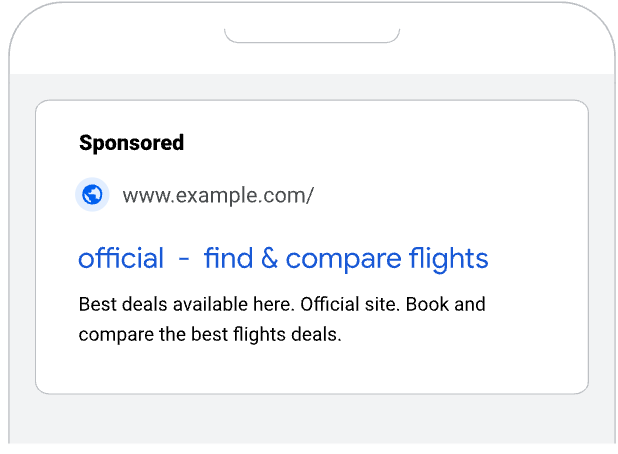
Google highlights that unbranded ads can confuse users searching for specific airlines or official websites. When ads don't clearly identify the advertiser, it can trigger Limited Ad Serving.
✅ AdShot Tip: Always lead your ad titles with your verified domain (e.g., myagency.com – Flight Change Experts) to show authenticity and avoid confusion with airline brands.
Example 2: Referencing Another Brand Without Clear Relationship
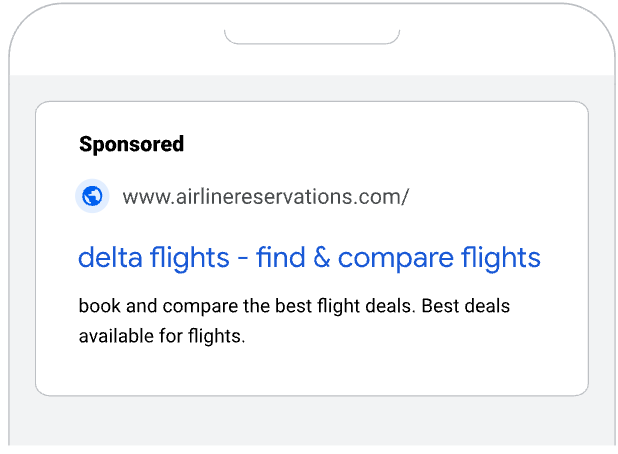
Using another brand's name, likeness, or logo — especially in travel — can mislead users if your business isn't officially affiliated. Ads like "Delta Flights – Find & Compare Tickets" without disclosure may violate Unacceptable Business Practices.
✅ AdShot Tip: Never use airline or brand names in headlines unless you have authorization. Reference the service type instead: "Flight Change Assistance" with your agency identity prominent.
Example 3: Best Practice — Pin Your Domain to the Front
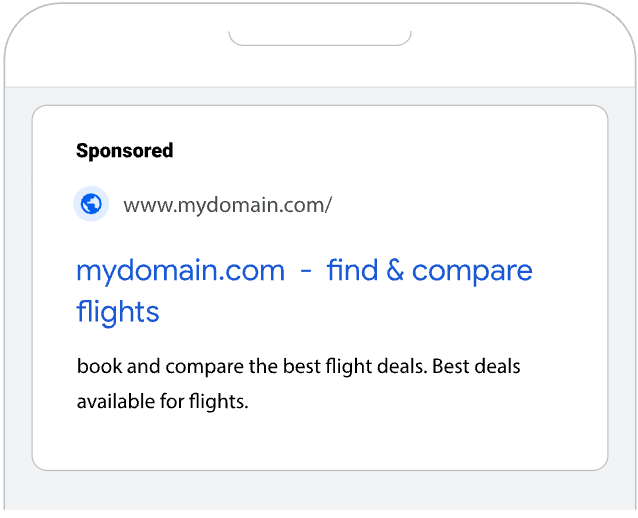
Google recommends pinning your domain name to the first headline position in RSAs. Here's how:
- Open Google Ads → Create or edit a Responsive Search Ad.
- Locate your domain headline field and click the 📌 Pin icon.
- Select "Show only in position 1."
- Click Save to lock your domain at the front of every ad variation.
✅ AdShot Tip: For travel advertisers, pinning your domain builds trust and compliance visibility — reducing misinterpretation under brand impersonation policies.
Top 7 Risk Reducers (Do These Before Scaling)
Complete Advertiser Verification
Finish Advertiser verification and keep entity info consistent across your site, ads, and business profiles. Inconsistencies between your Google account and your site's "About" page trigger distrust signals.
Add "We Are a Travel Agency" Disclosure
Add a clear disclosure in your site header and footer: "We are a travel agency, not affiliated with any airline." This single change has lifted LAS throttling in multiple accounts we've worked on.
Publish a Fees & Refunds Page
Explain your exact scope vs airline control. What you handle, what the airline decides, what your fees are. Link it from your ads and landing pages. This is one of the most common missing elements in throttled travel accounts.
Verify Phone Numbers and State Hours
Use only verified phone numbers in call extensions. State hours, add a call recording notice, and align your location extensions. Unverified forwarding numbers and "airline desk" phrasing are direct LAS triggers.
Show Physical Address, About Page, Complaint Channel
Add an airline trademark usage statement if you reference any airline. Real company identity (address, team, complaint route) dramatically improves trust signals.
Remove "Official / Guaranteed / Instant" Language
Every claim in your ads must be verifiable. "Instant confirmation" when you don't control that. "Guaranteed refund" when you don't. "Official airline support" when you're an agency. All three are UBP triggers.
Start Conservative — Expand as Trust Builds
Launch with brand-safe routes and exact match keywords only. Expand to broader match types and higher budgets as CTR improves and user feedback signals stabilize. LAS lifts organically when signals consistently improve.
Pre-Launch Checklist for Flight Booking / Changes / Cancellations
Cross-check these before scaling budgets. Each item reduces UBP risk and helps lift LAS throttles.
Identity
- Business name, address, registration, and contact shown site-wide
- About & Team page with real photos/LinkedIn
- Airline trademark usage statement (if applicable)
Disclosure
- Header/hero strip: "We are a travel agency / intermediary"
- Fees & Refunds page with examples and limits
- Phone policy: hours, call recording notice, complaint link
Verification
- Finish Advertiser verification
- Domain alignment with business docs
- Consistent NAP (name/address/phone) across all assets
Ad Copy & Assets
- Domain pinned to headline position 1
- No airline names unless authorized
- No "official / guaranteed / instant" language
Case Study: 12-Hour Recovery — Flight Change Campaign
A US agency running "flight change & cancellation" call ads saw instant UBP suspension. Here's exactly what we found and what we did.
What we found in the audit
- Headline tone implied official airline support
- Phone asset unverified with mismatched country code
- No fees or refunds page on the site
- No "agency" disclosure in site header or footer
What we fixed — and what happened
- Implemented "We are a travel agency" disclosures (header, footer, ad copy)
- Rewrote ad copy to remove airline affiliation signals
- Verified phone number and aligned location extensions
- Added Fees & Refunds page with clear scope statement
- Filed appeal mapping each fix to specific UBP policy language
Outcome: Account reinstated in approximately 12 hours. LAS lifted over the following week as trust signals stabilized.
How AdShot Media Recovers Suspended Travel Accounts (7 Steps)
Evidence Sweep
Export policies, disapprovals, change history, ad previews. Crawl and screenshot the live site. Build the full picture before touching anything.
Trust Audit (2 hours)
Brand/entity consistency, address/phone/registration, About & Team page, complaint channel, privacy/T&Cs quality.
Disclosure Retrofit
Header/hero strip ("We are a travel agency"), footer repeat, fees page, refund scope statement — all live before any appeal is filed.
Phone & Asset Hygiene
Verify numbers, state hours and call notice, align location extensions, clean sitelinks of any airline affiliation signals.
Copy/Creative Rewrite
Remove "official/guaranteed/instant" language. Include agency identity in headlines/paths. Pin domain to position 1.
Appeal Dossier
Map each fix to UBP clauses with before/after screenshots. Cite verification completion and new pages added. Never file generic appeals.
LAS De-throttle Plan
Relaunch with conservative budgets and exact match. Expand as CTR and user feedback improve. LAS lifts when trust signals consistently build.
Frequently Asked Questions
What is Limited Ad Serving in Google Ads?
Limited Ad Serving is Google's system that restricts impressions for advertisers who haven't demonstrated sufficient trustworthiness, especially in high-abuse industries like travel. It is not a formal disapproval and cannot be appealed like a policy violation — instead, it lifts as trust signals (verification, disclosures, positive user feedback) improve over time.
Can I appeal Limited Ad Serving directly?
Not through the standard disapproval appeal process. Limited Ad Serving lifts organically as Google's systems see improved trust signals: completed advertiser verification, better disclosures, lower complaint rates, and positive user engagement over time.
What is the fastest way to lift Limited Ad Serving?
Complete Advertiser Verification, add clear "travel agency" disclosures to your site header and footer, publish a Fees & Refunds page, verify your phone number, and remove any language implying airline affiliation. These signal changes can lift LAS within days to weeks.
What's the difference between UBP suspension and Limited Ad Serving?
UBP (Unacceptable Business Practices) is a formal suspension — Google stops your account completely and requires a policy-mapped appeal. Limited Ad Serving is a throttle — your ads still show but at significantly reduced impression volume. UBP requires active appeal. LAS requires trust-building over time.
Is Your Travel Account Throttled or Suspended?
AdShot Media will audit your entity trust, disclosures, and assets — and prepare a policy-mapped recovery plan for Limited Ad Serving and UBP suspensions.
© 2026 AdShot Media. All rights reserved.